
Media Facade Lighting & Pixel Mapping: Turning a Landmark Into a Canvas

Media facade lighting turns the outside of a building into a programmable surface: thousands of individually controlled LED pixels that can show slow color gradients, animated patterns, event looks, or full video content across an entire elevation. The technique that makes it work is pixel mapping, where content is laid over a digital map of every light point on the building and played back in real time. For hotels, casinos, arenas, office towers, and mixed-use landmarks, a media facade is the difference between a building that is simply lit and a building people photograph.
It is also one of the most demanding lighting projects an owner can take on. A media facade is part architecture, part video system, part data network, and part high-rise construction job. This guide explains how media facades and pixel mapping actually work, how to choose resolution for real viewing distances, what drives scope and budget, and how the WDM Lighting project team designs, supplies, installs at height, programs, and services these systems as one accountable team.
A media facade is a building exterior covered with addressable LED pixels that are controlled individually, so the whole elevation can act like a very large, low-resolution screen. Pixel mapping software or a media server translates video and effects into lighting data (usually Art-Net or sACN over Ethernet, converted to DMX or pixel protocols near the fixtures), so each pixel shows the right color at the right moment.
- Best for: hotels, casinos and resorts, arenas and venues, office tower crowns, flagship retail and mixed-use landmarks
- Key decisions: pixel spacing vs viewing distance, fixture type, control architecture, content plan, access and maintenance
- Biggest risk: treating it as a product purchase instead of an engineered system with a service plan
- Cost: project-specific — driven by area, pixel density, access, controls, and content
What is a media facade?
Traditional facade lighting washes a surface with light or traces its lines in one color at a time. A media facade goes further: every light point on the building has its own address and can be set to any color and brightness independently, many times per second. Put enough of those points across a surface, and you can draw on the building.
Media facades come in a few main forms, and most landmark projects combine more than one:
- Pixel-point facades: individual RGB or RGBW nodes mounted in a grid or following the architecture. Pixels can be spaced widely, so the building still reads as architecture by day while becoming a light canvas at night.
- Linear pixel facades: addressable linear LED bars or strip along mullions, floor edges, or fins. Each bar is divided into pixel segments, which is how vertical light lines can carry chases, gradients, and animations.
- Mesh and curtain systems: semi-transparent LED mesh or strips hung on the facade or behind perforated cladding, keeping daylight and views for occupants while adding a denser image.
- Media-capable floods and wall washers: color-changing floods and multi-segment LED wall washers brought into the same pixel map, so large solid surfaces and the fine pixel work behave as one scene.
- Full LED video surfaces: dense, cabinet-based LED screens built into the facade for true video. These are the highest-resolution option and sit at the boundary between architectural lighting and digital signage.
The right mix depends on what the building is for and how it is seen. A hotel tower viewed across a freeway needs a very different system than a casino entry viewed from a few feet away. For the wider set of exterior approaches, see our guides on choosing lighting for architectural spaces and architectural lighting trends for modern buildings.
What is pixel mapping?
Pixel mapping is the process of telling the control system exactly where every pixel sits on the building, then using that map to play content. The software holds a virtual model of the facade: each node, bar segment, or fixture appears at its real position. When a video, image, or generated effect runs across that model, the software samples the color under each pixel and sends it out as lighting data. The result is that a gradient or animation designed on a screen lands on the building in the right shape and in the right place.
A working pixel-mapped facade has a clear control chain:
- Content: video files, generated effects, color scenes, or live inputs, prepared at the facade's real resolution.
- Pixel mapping engine or media server: dedicated software or hardware that stores the map, runs a schedule, and converts content into lighting data. Desktop pixel mapping software paired with an interface such as an Art-Net / DMX USB interface suits smaller systems; larger landmarks usually run on a dedicated, always-on controller or media server.
- Network backbone: Ethernet carrying Art-Net or sACN, the two common protocols for sending many DMX universes over a network. Our DMX vs Art-Net vs sACN guide explains the difference.
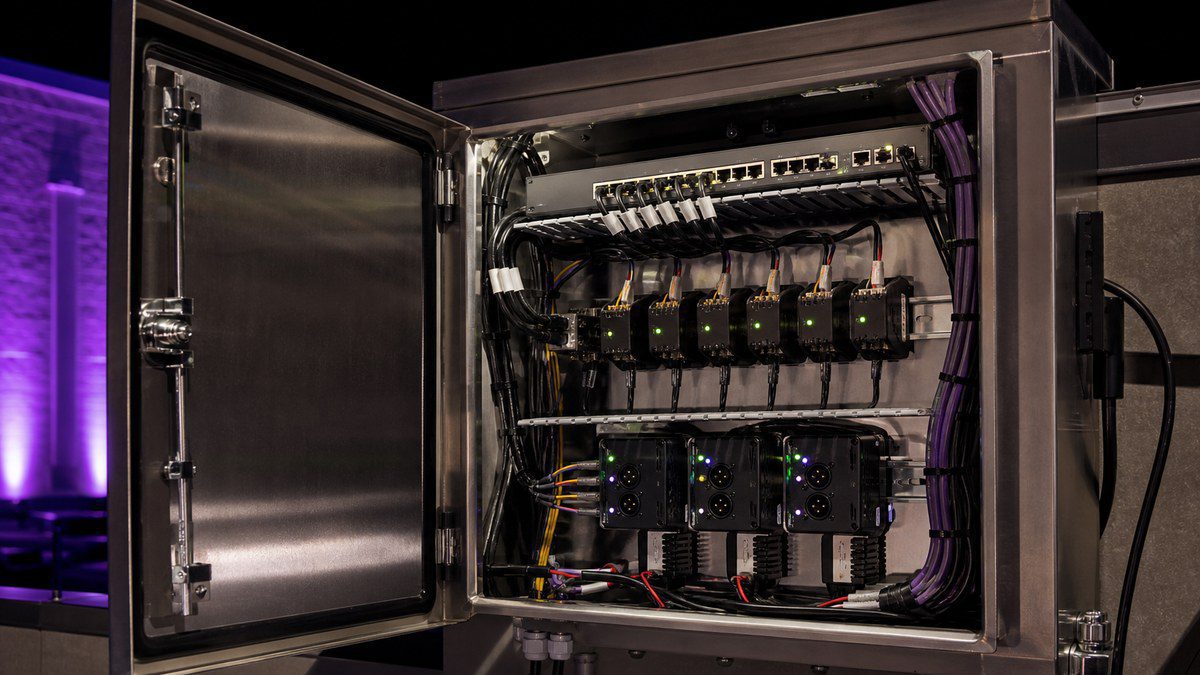
- Gateways and pixel controllers: devices near the fixtures that convert network data into DMX or the pixel protocol the LEDs use, often alongside DMX decoders for simpler fixtures.
- Power and pixels: outdoor-rated power supplies and the LED nodes, bars, or floods on the building.
Every link in that chain has to be designed together. A beautiful content file means nothing if the network drops packets, a gateway is overloaded, or one wet connection takes a whole run offline.
Those numbers are why pixel mapping lives on a network. A modest facade of 10,000 RGB pixels needs roughly 59 universes of data, refreshed continuously. That is far more than a single DMX cable can carry, so the data travels over Ethernet and is broken out into DMX or pixel outputs close to the fixtures.
Media facade technologies compared
| System | What it shows | Daytime look | Best for |
|---|---|---|---|
| Pixel points (nodes) | Patterns, gradients, low-res animation | Discreet dots on the facade | Towers, hotels, parking structures, canopies |
| Linear pixel bars | Chases, waves, line-based animation | Thin lines following the architecture | Mullions, fins, floor edges, crowns |
| LED mesh / curtain | Denser images and graphics | Semi-transparent screen | Glazed facades, garages, entertainment venues |
| Media-capable floods & washers | Large color fields that move with the map | Fixtures hidden on ledges and roofs | Stone, concrete, and textured surfaces |
| LED video surface | True video and readable graphics | A visible screen | Casinos, arenas, flagship retail, plazas |
Resolution: matching pixel spacing to viewing distance
The most important design decision on a media facade is how far apart the pixels are. That spacing, called pixel pitch, decides how detailed the content can be, how many fixtures and universes are needed, and how much the system weighs, draws, and costs.
The guiding principle is simple: design for the people who will actually look at the building. Rules of thumb vary between manufacturers, but they all point the same way: the farther the viewer, the wider the spacing can be. One common guideline for LED screens is that the minimum comfortable viewing distance in meters is roughly equal to the pixel pitch in millimeters; other manufacturers recommend about twice that distance. Architectural pixel facades are usually far coarser than video screens, because they are seen from blocks or miles away and are meant to carry light and motion more than fine detail.
We plan every facade around three sightlines, the same way we approach office tower crown lighting:
- Close range: the sidewalk, the drop-off, the entry. Here pixels read as individual points, so fixture appearance, glare, and brightness control matter most.
- Neighborhood range: across the street, from the plaza, or from nearby buildings. This is where most patterns and gradients are judged.
- Skyline range: from freeways, other towers, and across the city. At this distance even widely spaced pixels blend into smooth images, so bold motion and color carry the design.
More pixels is not automatically better. A coarser grid that the content team designs for properly often looks more striking from the skyline than a dense system running content made for a television. Spend the budget where your audience actually stands.
Content: what a media facade should actually play
The hardware is only half the project. A media facade is judged night after night by what it shows. The strongest landmark facades share a few habits:
- A calm signature look: a slow, ownable default scene that defines the building most nights. Constant fast motion becomes noise to neighbors and drivers.
- A calendar of moments: holidays, team colors on game nights, awareness months, conventions, and property events, scheduled ahead and triggered automatically.
- Brand without billboards: color and motion that suggest the brand, rather than logos and text that can run into sign rules and look dated quickly.
- Content made for the map: files built at the facade's real resolution and proportions, previewed on the pixel map before they ever reach the building.
- Night-by-night brightness: dimming curves that respond to the hour, the season, and the surroundings, which also protects pixel life.
Responsible lighting is part of the content plan. Programs such as Lights Out Texas, led by the Cornell Lab of Ornithology and partners, ask tall buildings to turn off or dim unnecessary lighting on peak spring and fall bird-migration nights. A pixel-mapped facade is ideally suited to that: a migration-night scene can be scheduled in advance at a fraction of normal output. Projects near airports also need to be coordinated with required FAA obstruction lighting, as we cover in our crown lighting guide.
Planning a media facade or pixel upgrade?
Tell us about your building, the views that matter, and what you want it to do at night. Our project team will review it and follow up with next steps and a project-specific proposal.
Engineering a media facade that survives outdoors
Indoors, an LED video wall lives in a controlled room. A media facade lives on the outside of a building through summer heat, storms, wind, UV, and years of thermal cycling. The engineering is where long-term success or failure is decided.
Mounting and structure
Every pixel, bar, and power supply needs a mounting method that respects the building envelope, the cladding, and any warranty on the curtain wall. Brackets, rails, or cable systems have to handle wind load and be serviceable later without removing half the facade.
Weatherproofing
Outdoor-rated fixtures are only the start. The connections between them are the weak point on most facades. On our Lorenzo Hotel facade project in Dallas, new connections at height were soldered and sealed, and data runs used IP-rated outdoor Cat5e, because loose or unsealed joints are a leading reason sections go dark. Our facade lighting repair guide explains those failure patterns in detail.
Power distribution
Thousands of pixels draw real power. Supplies need to be sized, ventilated, protected, and placed where crews can reach them. Splitting the facade into zones with remotely switchable circuits means a section can be restarted without a site visit, an approach we used at the Lorenzo with four TCP/IP-controlled circuit breakers.
Data integrity
Pixel data is unforgiving. Long runs need correct cable, correct termination, and sensible segment lengths. Splitting the building across several gateways or controllers means one fault never takes down the whole canvas. On the Lorenzo, the facade was divided across eight Ethernet-to-DMX gateways, and every DMX line was finished with 120-ohm terminating resistors to prevent the reflections that cause flicker and color errors.
Access at height
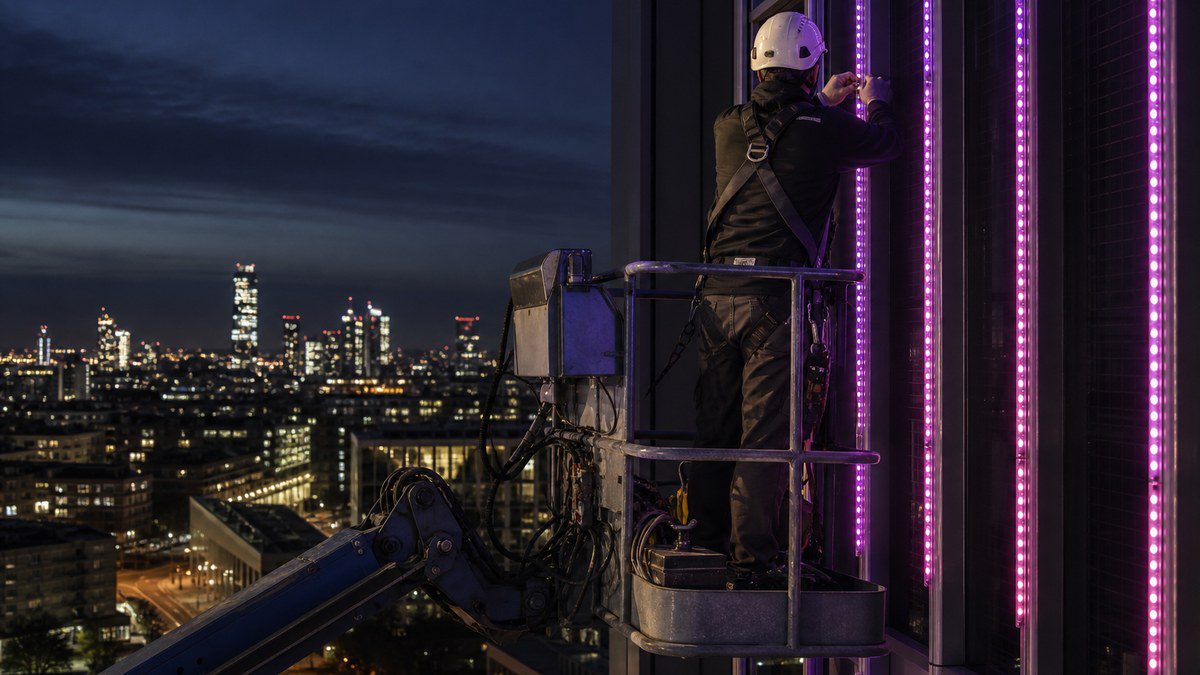
Someone has to install every pixel, and someone has to reach it again for service. Access planning shapes cost and schedule as much as the hardware does. Large articulating boom lifts reach roughly 135 to 150 feet; above that, or where lifts cannot set up, rope-access technicians work from the roof. Rope descent systems are governed by OSHA 29 CFR 1910.27(b), which generally limits them to 300 feet unless other access is infeasible or more hazardous, requires anchorages rated for at least 5,000 pounds per worker, and calls for building owner certification and regular inspection of anchorages. On the Lorenzo, we combined both methods: boom lifts for reachable areas and a two-person rope-access crew at nine high-point locations.
New build or retrofit: adding pixel mapping to an existing facade
Many owners already have color-changing lighting on their building and ask whether it can become a media facade. Often, part of it can. The questions we work through are:
- Are the existing fixtures individually addressable? Fixtures controlled only in large groups cannot be pixel mapped in detail, but they can still join the map as large color fields.
- Is the control system network-based? A standalone controller in a closet usually needs to be replaced or extended with a network backbone and gateways before pixel mapping is practical.
- What condition are connections and power supplies in? A night survey shows dark sections, flicker, and color mismatches that must be fixed before adding content. A lighting performance audit is a good first step.
- Where should new pixels go? Adding linear pixel bars to key lines, or a pixel grid to one signature elevation, can deliver most of the impact for a fraction of a full-facade system.
The Lorenzo project is a good example of the retrofit path: an existing landmark facade with vertical color-changing light lines, brought back to full performance with high-point repairs, a networked gateway system, remote power control, DMX-writer addressing, and commissioning of its color scenes. The same backbone is the kind of foundation more advanced content can run on later.
What drives the scope and budget
Every media facade is different, so WDM Lighting prepares project-specific proposals rather than price lists. These are the factors that move scope the most:
| Factor | Why it matters | How to control it |
|---|---|---|
| Area and pixel density | Sets fixture count, universes, power, and weight | Design density for real viewing distances |
| Fixture type | Nodes, bars, mesh, floods, and video differ widely | Mix types: dense only where people look closely |
| Access | Lifts, rope access, permits, closures | Plan install and future service together |
| Control system | Simple scheduling vs full media server and live inputs | Match control to how the owner will actually use it |
| Retrofit vs new | Reusing working fixtures and pathways saves cost | Survey and audit before redesigning |
| Content | Signature look, event library, ongoing updates | Build a reusable library and schedule |
| Service plan | Keeps pixels, power, and data healthy for years | Annual inspection plus remote monitoring |
How a media facade project runs with one team
Big lighting projects fail most often at the handoffs: a designer who never climbs the building, a supplier who never sees the site, an installer who did not choose the controls, and a content team that inherits a map with errors. We run media facade projects as one continuous job:
1. Night survey and goals
We study the building at night from all three sightlines, document existing lighting, and agree on what the facade should achieve: identity, events, brand, or all three.
2. Concept, mock-up, and pixel layout
We define fixture types and pixel spacing, then test them with on-site mock-ups at night. The pixel layout becomes the master map for engineering, installation, and content.
3. Engineering and access plan
Mounting, power, data, network, and the access method for every zone are engineered together, along with permits, closures, and coordination with the building's operations.
4. Supply and installation at height
Fixtures, controllers, cable, and power equipment are supplied and installed by our crews on lifts and rope access, section by section, with each zone tested before the equipment moves on.
5. Addressing, mapping, and programming
Every pixel is addressed and verified against the map, then the signature look, event scenes, schedules, and dimming are programmed and reviewed on site at night.
6. Handover and service
The owner's team receives documentation, maps, and simple day-to-day control, with WDM Lighting available for maintenance, repairs, and new content.
Why owners choose WDM Lighting for big projects
WDM Lighting is based at 150 Express Street in Dallas and works on large lighting projects for hotels, commercial buildings, and venues. One team covers the full scope:
- Design and engineering of pixel layouts, fixtures, control systems, and power
- Supply from our own catalog, including RGB pixel nodes, RGB pebble pixel strings, color-changing floods, outdoor-rated DMX controllers, and fiber optic lighting and illuminators for interiors
- Installation and high-point access with boom lifts and rope-access crews
- Addressing, pixel mapping, and programming of DMX and networked control
- Service and maintenance after handover
See our work on the Lorenzo Hotel, Mosaic Dallas, and the Davis Building, browse the projects page, explore our commercial lighting services, or learn about WDM Lighting. For venue-scale systems, read our arena and stadium LED lighting guide, and find more on the WDM Lighting blog.

Frequently Asked Questions
What is media facade lighting?
What does pixel mapping mean in lighting?
What is the difference between a media facade and an LED screen?
How far apart should pixels be on a building facade?
What control protocols do media facades use?
Can existing facade lighting be upgraded to pixel mapping?
How are media facades installed and serviced on high-rise buildings?
Do media facades have to follow bird-migration or FAA rules?
How much does a media facade cost?
Tell us about your project
Hotels, towers, venues, and large commercial buildings. Share a few details and our project team will follow up.
